
A cordless vacuum cleaner that loses suction, shuts off mid-clean, refuses to start, or stops charging does not automatically have a dead motor or a dead battery. These symptoms commonly come from the battery state, a blocked filter or air path, a wrapped brush roll, or a charging connection. Work through those first, then decide whether the unit needs service.
Scope: this page covers common cordless stick vacuum problems and safe checks. It does not cover an upright vacuum, a canister vacuum, or robot vacuums, and it does not cover opening the motor, the battery pack or the control board.
Note on model differences: battery type, filter design, brush roll access and charging indicators vary by brand and model, and the same brand can differ between models. Use the manual for your unit.
7 Common Cordless Stick Vacuum Problems
1. Cordless Vacuum Keeps Shutting Off
Possible causes: low charge or an unhealthy battery; a clogged filter or blocked air path; a brush roll wrapped with hair; overheating protection; a battery or internal electrical fault.
What to check: charge the unit fully, empty the bin, check the filter and the air path, and clear the brush roll. If it still shuts off after those steps, contact the manufacturer or a technician.
On overheating protection: if the unit was hot when it stopped, let it cool before retrying. Do not put it straight back on charge while it is still warm; the manual for your model may specify a cooling period.
2. Cordless Vacuum Losing Suction
Possible causes: a full bin; a clogged or wrongly seated filter; a blockage in the wand, head or air path; a poor seal at a joint; a motor or internal fault.
What to check: work along the whole air path, not just the filter. Check the blockage and the seal before considering the motor; a vacuum lost suction problem is usually found in one of those two places.
3. Cordless Vacuum Battery Drains Too Fast
Possible causes: running in the highest power mode; heavy brush roll drag; normal capacity loss over time; an abnormal battery temperature or charge state; a faulty battery.
What to check: compare runtime in the same mode, on the same surface, at a similar room temperature. If the manual gives only one runtime figure and does not state the mode, treat a large drop from your own past runs as the signal rather than comparing against the box.
4. Cordless Vacuum Won’t Turn On
Possible causes: flat battery; battery not seated; charger or charging port problem; overheating protection; a trigger, battery or internal circuit fault.
What to check: confirm the charger and port work by testing the outlet with another device and, where possible, trying a second charger. Reseat the battery if it is removable, and let the unit cool if it was hot. If it still will not start with a known-good charge, that is a service question.
5. Cordless Vacuum Not Charging
What to check: the outlet with another device; the charger and cable for damage; the charging contacts for dust; the battery seated fully; and whether the charge indicator matches what the manual describes.
On the indicator: a charge light that does not come on while the unit still starts points to the indicator or the charging circuit rather than the battery, so check both before replacing anything. Do not apply one brand’s light-color meaning to another brand, or to a different model of the same brand; indicator behavior is not standardized.
6. Cordless Vacuum Brush Roll Not Spinning
Possible causes: hair wrapped around the roll; the roll jammed; a poor connection at the head; a brush motor or drive fault.
What to check: switch off and remove the battery or unplug before clearing the roll, as the manual directs. On a model where the battery cannot be removed, follow the manual’s isolation step for that model rather than assuming unplugging is enough. Never clear the roll while the unit is running.
On the head connection: if the roll spins when you press the head connector in and stops when you let go, the connection is the likely cause rather than the roll itself.
7. Cordless Vacuum Making Loud or Unusual Noise
Possible causes: debris wrapped in the brush roll; a blockage in the head or air path; a loose part; a fault in the air path or motor.
What to check: stop using it if you hear grinding, a sharp noise, a burning smell, or if the housing becomes hot to the touch. Clear what you can reach, and if the noise continues, treat it as a service issue.
How to Troubleshoot a Cordless Stick Vacuum Step by Step
- Check the charge and charging state.
- Empty the bin.
- Check the vacuum filter and clean it as the manual directs.
- Check the head, wand and air path for blockages.
- Check the brush roll for wrapped hair.
- Confirm every part is seated as the manual shows.
- Restart and see whether the fault is gone.
Two safety notes: a filter must be cleaned and fully dry before refitting — refitting a damp filter can cause odor, moisture in the motor and protection shutdowns — and you should not run the unit with the filter removed to “test suction.” That lets debris into the motor and is not a valid test.
To confirm a filter is dry, follow the manual’s drying time; if it gives none, let it air-dry until it feels dry throughout, not just on the surface.
When Does a Cordless Vacuum Need Professional Repair?
Contact the manufacturer or a qualified technician if:
- Suction is still gone after cleaning the filter and clearing the air path.
- The unit charges normally but will not start.
- The battery will not charge, or runtime is clearly abnormal.
- The unit shuts off repeatedly during use.
- The motor makes an abnormal noise that continues after clearing the brush roll.
- The battery is swollen, leaking, unusually hot, or there is a burning smell.
If the battery is swollen or hot, stop using and stop charging it, do not open the pack, and contact the manufacturer for disposal and replacement guidance rather than putting it in household waste.
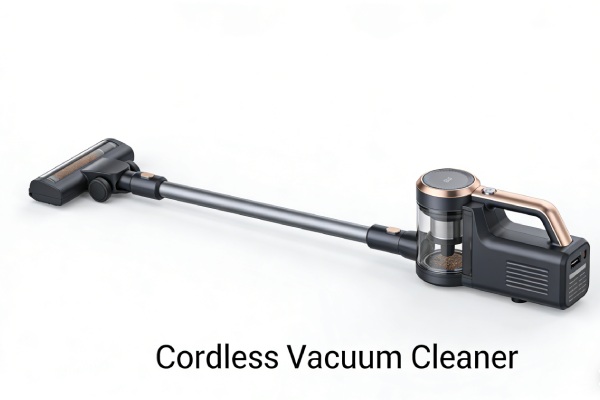
Is It Worth Repairing or Replacing a Cordless Stick Vacuum?
There is no fixed percentage or age rule. Decide on these factors:
- Which part failed, and whether it is sold as a spare.
- Whether the battery is user-replaceable on your model.
- Whether the unit is still in warranty.
- The repair quote against the price of a comparable replacement.
- Whether other parts are already worn.
A replaceable battery is one of the strongest factors in this decision. On a model where the battery is sealed, a dead pack usually ends the unit’s life; on a model with a removable pack, the same fault is a part swap. On a sealed-battery model, confirm the fault is not the filter, the air path or the charger before deciding the unit is finished; those three are cheaper to rule out than a replacement.
How to Make a Cordless Stick Vacuum Last Longer
- Empty the bin and clean the filter on the manual’s schedule.
- Do not pick up material the manual excludes, such as liquids or fine construction dust.
- Clear wrapped hair from the brush roll promptly.
- Charge and store as the manual directs.
- Avoid long runs with blocked ventilation.
- Follow the manual when handling or replacing the battery.
If the manual gives no charging or storage guidance, charge to full, then store off the charger in a cool dry place, and avoid leaving it flat for long periods.
Frequently Asked Questions
Why does my cordless stick vacuum keep shutting off?
Check charge, bin, filter, air path and brush roll first. If it was hot when it stopped, let it cool before retrying.
Why does my cordless vacuum lose suction?
A blockage, a full bin, a wrongly seated filter or a poor seal are more common than a motor fault. Work along the whole air path.
The charge light does not come on, but the vacuum still starts. What does that mean?
It points to the indicator or the charging circuit rather than a dead battery. Check the charger and the contacts before replacing anything.
How do I clear the brush roll on a model with a sealed battery?
Follow the manual’s isolation step for that model. Removing the battery is not possible on every unit, and unplugging alone is not the same as isolating it.
How long should I wait after overheating before using it again?
Use the cooling period in your manual. If none is stated, let it cool until the housing is no longer warm, and do not charge it while it is still warm.
How long should a cordless vacuum battery last?
Runtime depends on the mode, the surface, the room temperature and the battery’s age. Compare runs in the same mode and on the same surface.
Can a cordless vacuum battery be replaced?
On some models yes, on others the pack is sealed. Check the manual and the spare-parts listing for your model before assuming either way.
Why does my cordless vacuum stop after a few seconds?
A brief run followed by a stop often points to protection triggering or a battery that cannot supply current under load. Let it cool, recharge, and retest; if it repeats, contact the manufacturer.
Is it worth repairing a cordless stick vacuum?
It depends on which part failed, whether it is available as a spare, whether the battery is replaceable, the warranty status, and the quote against a replacement.