
Search Intent Opening
If your robot vacuum moves across the floor but leaves debris behind, or if you hear the motor running but the brush roller isn’t turning, or if the unit stops mid-clean and displays a “brush error”—the failure is either a mechanical jam, hair wrap, or motor failure. The robot will attempt to clean, but without brush rotation, nothing gets lifted off the floor.
In field service diagnostics across iRobot Roomba, Roborock, Shark, Ecovacs, and other brands, over 90% of brush failures are caused by hair wrap or debris jams. The remaining 10% are motor or gear failures. All are fixable without replacing the whole unit.
I’ve opened hundreds of these units on service calls. The user always says the same thing: “It goes around but doesn’t pick anything up.” 90% of the time, it’s hair wrapped around the brush ends or a small object jammed in the roller.
Search Query Coverage Block (Long-Tail Symptom Variations)
Users commonly describe this failure as:
- robot vacuum brush not spinning
- robot vacuum brush roller not turning
- robot vacuum not picking up debris
- robot vacuum brush stuck
- robot vacuum brush error
- roomba brush not spinning
- roborock brush not spinning
- shark robot vacuum brush not spinning
- deebot brush not spinning
- robot vacuum leaves hair on carpet
- robot vacuum brush won’t rotate
- robot vacuum makes noise but brush not moving
- robot vacuum brush stopped working
- robot vacuum not agitating carpet
- robot vacuum brush motor not working
- robot vacuum hair wrapped around brush
- robot vacuum brush jammed
- robot vacuum side brush not spinning
Observed Failure Patterns
Pattern A – Brush makes noise but doesn’t rotate
Occurs when robot is running on carpet or hard floor. Indicates motor is receiving power but drive mechanism is disengaged or gears are stripped. Does NOT indicate electrical failure—motor is running.
Pattern B – Brush rotates freely when removed, stops when installed
Occurs after cleaning brush and reinstalling. Indicates hair or debris is wrapped around the brush ends inside the housing, creating resistance under load. Does NOT indicate motor failure—motor can’t overcome friction.
Pattern C – Robot stops mid-clean with “brush error”
Occurs when foreign object (toy, cord, sock) gets sucked into roller. Indicates motor protection circuit tripped from overload. Does NOT indicate permanent motor damage—clearing jam restores function.
Pattern D – Brush turns but leaves debris on carpet
Occurs during normal cleaning cycles. Indicates brush bristles are worn, bent, or too short to agitate carpet fibers. Does NOT indicate motor speed issue—brush is rotating but not engaging debris.
Pattern E – Brush spins on hard floor but stops on carpet
Occurs when robot transitions from hard surface to carpet. Indicates carpet pile height exceeds brush clearance or motor lacks torque for high-resistance surfaces. Does NOT indicate battery issue—motor draws more current on carpet.
Pattern F – Side brush not spinning, main brush works
Occurs during normal operation. Indicates side brush motor failure, gear damage, or hair wrap at side brush shaft. Does NOT indicate main brush motor issue—two separate systems.
Most Common Root Causes (Ranked by Field Frequency)
| Rank | Cause | Frequency |
|---|---|---|
| 1 | Hair wrapped around brush ends | 45% |
| 2 | Foreign object jammed in roller | 20% |
| 3 | Brush motor failure | 12% |
| 4 | Worn or deformed bristles | 10% |
| 5 | Stripped drive gear | 6% |
| 6 | Carpet pile too high | 4% |
| 7 | Side brush motor failure | 3% |
1. Hair wrapped around brush ends (45%)
- Why: Long hair wraps around brush shaft ends, creates friction, prevents rotation
- Trigger: Brush spins when removed; stops when reinstalled under load
- Confirm: Visible hair wrapped around ends; brush won’t spin by hand when installed
- Disprove: Brush spins freely in housing; no visible hair at ends
2. Foreign object jammed in roller (20%)
- Why: Small toy, sock, cord, or debris caught between brush and housing
- Trigger: Sudden stop with brush error; clicking noise from brush area
- Confirm: Object visible when brush removed; roller won’t turn by hand
- Disprove: Brush rotates freely; no object in housing
3. Brush motor failure (12%)
- Why: Motor windings burned out; motor brushes worn; thermal fuse blown
- Trigger: No brush rotation on any surface; no noise from brush area
- Confirm: No voltage at motor terminals during operation; motor doesn’t spin when bench-tested
- Disprove: Motor spins with direct power; brush rotates on hard floor
4. Worn or deformed bristles (10%)
- Why: Bristles bend permanently after use; bristles too short to reach carpet
- Trigger: Brush spins but leaves debris; cleaning performance drops
- Confirm: Bristles flattened or bent; replacement brush restores performance
- Disprove: Bristles upright; debris pickup normal
5. Stripped drive gear (6%)
- Why: Plastic gear teeth worn or broken; gearbox stripped from overload
- Trigger: Motor runs but brush doesn’t turn; grinding noise
- Confirm: Motor shaft turns but brush gear doesn’t; visible gear damage
- Disprove: Gear teeth intact; brush turns when motor runs
6. Carpet pile too high (4%)
- Why: Carpet height exceeds brush clearance; motor lacks torque
- Trigger: Brush spins on hard floor; stops or slows on carpet
- Confirm: Brush turns freely when unit lifted; stops when lowered onto carpet
- Disprove: Brush spins on carpet; carpet pile is low
7. Side brush motor failure (3%)
- Why: Side brush motor burned out; hair wrapped around shaft seized motor
- Trigger: Side brush not spinning; main brush works
- Confirm: Side brush shaft won’t turn by hand; no voltage at motor
- Disprove: Side brush spins freely; motor runs
Brand-Specific Failure Patterns
iRobot Roomba (i3, i7, s9 series)
Common issue: hair wrapped around dual rubber roller ends. The rubber rollers spin independently; hair packs into the end caps, creating friction that stops both rollers.
Diagnostic shortcut: Remove rollers. Cut hair from both ends of each roller. Clean the roller housing cavities where end caps seat.
Roborock (S5, S6, S7 series)
Common issue: brush motor overload protection triggers on high-pile carpet. The unit stops brush rotation but continues moving. This is torque sensing, not motor failure.
Diagnostic shortcut: Test on hard floor first. If brush spins, the motor is fine. For carpet, reduce pile height or use carpet mode setting in app.
Shark IQ / RV series
Common issue: brush roller jams from pet toys or cords. The brush cover uses clips that can break if forced open. Jam detection is sensitive.
Diagnostic shortcut: Remove brush cover carefully—clips break easily. Clear any object from brush housing. Power cycle unit before restarting.
Ecovacs Deebot (Deebot N8, T8, T9 series)
Common issue: stripped brush drive gear after repeated jams. The plastic gear wears down over time; motor runs but brush doesn’t turn.
Diagnostic shortcut: Remove brush. Run motor with brush out. If motor shaft spins but brush gear doesn’t engage when reinstalled, replace brush motor module.
Tools Needed for Brush Cleaning
- Small scissors or seam ripper (for cutting hair)
- Microfiber cloth
- Phillips screwdriver (if brush cover uses screws)
- Tweezers (for removing small debris)
- Flathead screwdriver (for prying jammed objects)
- Replacement brush (if bristles worn)
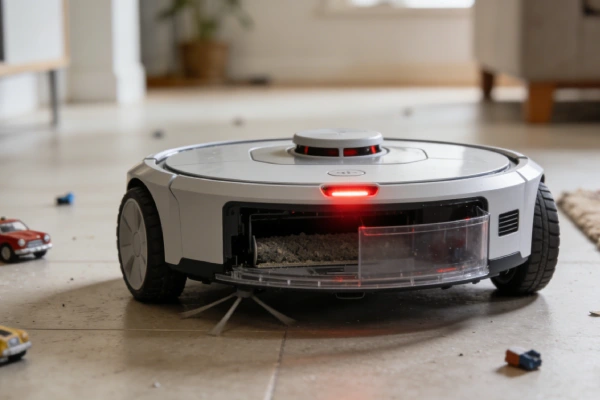
Rapid Triage Checklist (2-Minute Tests)
- Flip unit over; locate brush roller
- Remove brush cover. Lift brush out.
- Spin brush by hand. Spins freely? → go to Step 2
- Won’t spin; visible hair/debris → clean ends; remove objects
- Inspect brush ends (caps)
- Hair wrapped around ends? → cut away with scissors
- Caps spin freely on brush shaft? → if stuck, replace brush assembly
- Reinstall brush; spin by hand while in housing
- Spins freely with light resistance → go to Step 4
- Won’t spin; grinding → object in housing; gear damage
- Place unit on hard floor; start cleaning
- Brush spins → go to Step 5
- Brush doesn’t spin → motor failure or electrical issue
- Move unit to carpet (if applicable)
- Brush continues spinning → normal operation
- Brush stops or slows → carpet pile too high or motor torque insufficient
- Check side brush (if equipped)
- Side brush spins → main brush issue isolated
- Side brush doesn’t spin → separate motor failure
Step-by-Step Diagnostic Procedure
Step 1: Remove brush and inspect
Flip unit. Remove brush cover (usually 1–2 clips or screws). Lift brush roller out.
- Brush turns freely by hand? → Yes: skip to Step 3. No: go to Step 2.
Step 2: Clear brush jams
- Check brush ends for hair wrap. Cut hair at both ends with scissors. Remove end caps if possible; clean shaft.
- Check brush housing for foreign objects (toy, sock, cord). Remove any object.
- Reinstall brush. Spin by hand.
- Spins freely? → go to Step 3. Still stuck? → gear damage; replace brush module.
Step 3: Test brush rotation on hard floor
Place unit on hard floor. Start cleaning cycle. Observe brush through clear cover or remove cover and watch.
- Brush spins? → go to Step 4.
- Brush doesn’t spin? → motor failure or electrical. Go to Step 5.
Step 4: Test brush on carpet
Move unit to carpet. Start cleaning. Watch brush.
- Brush spins on carpet? → normal. If cleaning performance still poor, bristles worn.
- Brush stops or slows on carpet? → carpet pile too high or motor torque loss.
Step 5: Motor electrical test
With unit on hard floor and cleaning cycle running, listen at brush area.
- Humming or buzzing but no rotation? → stripped gear. Replace brush motor assembly.
- No sound, no movement? → remove brush; check if motor shaft spins when brush removed.
- Motor shaft spins when brush removed but not when reinstalled? → excessive resistance from hair or debris. Reclean ends and housing.
- Motor shaft doesn’t spin even with brush removed? → motor failure. Replace motor assembly.
Physical Layer Inspection
Brush roller
- Remove brush. Roll between palms. Should spin smoothly.
- Inspect ends: hair wrapped around shafts is the #1 cause of brush stop.
- Check bristles: bent, melted, or missing bristles reduce cleaning.
- Look for melted plastic at ends—indicates motor overheated from jam.
Brush end caps
- End caps should rotate independently of brush shaft.
- If caps seized to shaft, brush won’t spin under load. Replace brush.
Brush housing
- Shine light into housing. Look for debris, small objects, or broken gear teeth.
- Check drive socket (where brush end fits). Should turn when motor runs. If not, gearbox failure.
Side brush (if equipped)
- Remove side brush screw. Lift brush off.
- Inspect hair wrapped around shaft. Clean thoroughly.
- Spin shaft by hand. Should rotate with light resistance.
- If shaft won’t turn, motor seized. Replace side brush motor.
Drive belt (if belt-driven model)
- Some models use belt between motor and brush.
- Check belt for cracks, stretching, or breakage. Replace if damaged.
Electrical / Signal Verification
Brush motor voltage test (if accessible)
- Access brush motor terminals (requires disassembly).
- Run cleaning cycle. Measure voltage at motor terminals.
- Expected: 12V–24V DC depending on model.
- Voltage present but motor not turning → motor failure or gear jam.
- No voltage → control board failure; check wiring harness.
Motor resistance test
- Disconnect motor. Measure resistance across terminals.
- Normal: 5–20 ohms.
- Open circuit (infinite) → burned windings. Replace motor.
- Short circuit (0 ohms) → internal short. Replace motor.
Current draw test
- Not testable without clamp meter. Observable evidence:
- Motor runs briefly then stops → overload protection tripped (hair or jam).
- Motor runs but brush doesn’t turn → stripped gear.
Reset and Recovery Behavior Mapping
Normal reset after jam:
- User clears debris. Power cycle unit (hold power 10–15 seconds). Restart cleaning. Brush resumes rotation.
Failed reset behavior:
- After clearing jam, brush still won’t spin on next start. Indicates motor protection circuit hasn’t reset—needs longer power cycle (remove battery, wait 2 minutes).
- After clearing jam, brush spins but stops again immediately. Indicates recurring jam (hair still wrapped) or motor overheating.
Recovery after hair removal:
- Normal: brush spins freely; cleaning resumes.
- Failure pattern: brush spins but cleaning performance poor. Indicates bristles deformed from heat or wear—replace brush.
False Fixes That Do Not Work
“Run it again—maybe it will clear itself”
If hair is wrapped around the brush ends, running the robot repeatedly just wraps hair tighter. The brush won’t free itself. Manual removal is required.
“Replace the filter”
A clogged filter reduces suction but doesn’t stop the brush from spinning. If the brush isn’t turning, filter replacement won’t help.
“Update the firmware”
Firmware doesn’t control brush torque sensing beyond error reporting. If the brush motor isn’t physically turning, no software update will fix it.
“Buy a new battery”
Brush motor runs directly from battery voltage. If the battery is dead, the unit won’t move at all. If the unit drives but brush doesn’t spin, the battery is fine.
“Tap the brush cover”
Tapping won’t free a hair-wrapped brush or a jammed object. It may temporarily free a stuck gear, but the failure will return immediately under load.
Confirmed Fix Scenarios
Symptom: Brush spins when removed; stops when reinstalled. Hair visible at brush ends. iRobot Roomba i7.
Confirmed cause: Hair wrapped around brush end caps creating friction against housing.
Fix: Remove brush. Cut hair at both ends with scissors. Remove end caps; clean shaft. Reinstall.
Verification: Brush spins freely in housing; robot picks up debris on next run.
Symptom: Sudden stop mid-clean; brush error; small cat toy lodged in roller. Shark IQ.
Confirmed cause: Foreign object jammed between brush and housing. Motor protection tripped.
Fix: Remove brush cover. Extract toy. Clear any debris. Power cycle unit.
Verification: Brush rotates normally; robot resumes cleaning without error.
Symptom: Brush spins on hard floor; stops on carpet. Roborock S6.
Confirmed cause: Carpet pile too high for brush clearance. Motor lacks torque at that height.
Fix: Adjust carpet pile or use robot on lower-pile surfaces only. Alternatively, replace brush with low-pile carpet brush if available.
Verification: Brush spins on test carpet after adjustment.
Symptom: Brush makes humming noise but doesn’t turn. No visible hair or debris. Ecovacs Deebot T8.
Confirmed cause: Stripped drive gear in brush motor assembly. Motor runs but gear teeth missing.
Fix: Replace brush motor module. Access requires disassembly; module replacement.
Verification: Brush spins on hard floor and carpet after replacement.
Symptom: Side brush not spinning; main brush works. iRobot Roomba i3.
Confirmed cause: Hair wrapped around side brush shaft seized motor.
Fix: Remove side brush screw. Clean hair from shaft. Test shaft rotation. If shaft still won’t turn, replace side brush motor.
Verification: Side brush spins during cleaning cycle.
Symptom: Brush spins but leaves debris; bristles appear flattened. Shark RV1001.
Confirmed cause: Brush bristles worn or deformed after use. No longer agitating carpet.
Fix: Replace brush roller with OEM replacement.
Verification: Debris pickup returns to normal; brush agitates carpet fibers.
Prevent Future Brush Jams
- Trim long hair before cleaning: Hair wrap is the #1 cause of brush failure. Run robot in rooms with shorter hair buildup first.
- Check brush after each cleaning cycle: Flip unit; inspect brush ends. Remove hair immediately—don’t let it accumulate.
- Clear small objects from floors: Toys, cords, socks, and pet accessories will jam the brush. Pick up before running.
- Use scheduled cleaning with oversight: Don’t run robot unattended if small objects are frequently left on floors.
- Replace brush every 6–12 months: Bristles wear down; replacement brushes restore cleaning performance.
When to Replace the Brush
- Bristles flattened or bent: Brush spins but leaves debris.
- End caps seized: Caps won’t rotate independently; brush won’t spin under load.
- Brush shaft bent: Visible warping; brush wobbles when spun.
- Brush melted or deformed: Signs of motor overheating from repeated jams.
Post-Fix Verification Checklist
- Brush removed and reinstalled. Spins freely by hand when installed.
- No hair visible at brush ends. End caps rotate independently.
- No foreign objects in brush housing.
- Unit placed on hard floor. Start cycle. Brush spins within 5 seconds.
- Brush continues spinning for entire 2-minute test on hard floor.
- If carpet present: brush spins when unit moved onto carpet.
- Side brush spins (if equipped) during cleaning cycle.
- Debris pickup observed on test run (small debris placed in path is collected).
- No brush error codes appear on unit or in app.
Escalation Threshold
Board replacement required:
- Brush motor terminals show no voltage during operation; wiring harness intact.
- Control board has visible burn marks or swollen components.
- Multiple motors (main brush, side brush) simultaneously non-responsive.
Module replacement required:
- Brush motor assembly: motor runs but brush doesn’t turn; gear damage confirmed.
- Brush motor: no resistance across terminals (open circuit); won’t spin with direct power.
- Side brush motor: shaft seized; won’t turn by hand.
Factory repair required:
- Main control board failure requiring proprietary programming.
- Wiring harness damage inside chassis requiring complete disassembly.
- Multiple component failures (brush motor, side brush, sensors) suggesting electrical surge damage.
Decision criteria: If brush motor replacement cost exceeds 40% of new unit cost, recommend replacement. If unit has had three brush motor failures in 12 months, replace—housing debris or carpet height is destroying motors. If unit is under warranty, escalate to manufacturer.