
If your portable ice maker’s ice full light or add water light stays on when the bin is empty or the reservoir is full, the first things to check are outside the machine: whether the bin or tank is seated, whether the detection area is blocked, whether the water level is where the machine expects it, whether the detection surface is dirty, and whether the unit is in a state it needs to be reset from. Do not assume the sensor has failed before those checks.
Scope: this page covers indicator light faults on a portable ice maker and countertop ice maker. What each button and light normally means belongs to the ice maker controls page. A specific code belongs to the ice maker error code E1 page. A machine that stops normally when the bin fills belongs to the auto shut-off page, and a machine with no display at all belongs to the control board page.
Note on model differences: light colours, blink patterns, sensor type and reset procedure vary by brand and model, and they can differ between two models of the same brand. The same colour can mean different things on different units. Use the manual for your exact model.
Ice Maker Ice Full Light Stays On When the Bin Is Empty
This is the most common indicator complaint, and the cheapest to rule out first.
Possible Causes
- The ice basket is not seated as the manual shows.
- Ice or debris is blocking the detection area.
- The detection surface has dust, water droplets or residue on it.
- The ice full sensor is stuck in the position that reads as full.
- Wet ice in the basket is confusing the detection.
- The sensor or its circuit has genuinely failed.
What to Check, in Order
- Switch the machine off.
- Lift out the basket and check for leftover ice or debris.
- Look at the detection area the manual identifies, and check nothing blocks it. The area is usually near the ice chute, above the basket, or at the basket’s base, but the manual for your model is the only reliable guide.
- If the manual permits it, wipe the externally visible detection surface with a clean, dry soft cloth. Do not use a wet cloth, paper towel or alcohol cleaner on it unless the manual allows that, because moisture and fibres can smear the surface and alcohol can cloud some plastics.
- Refit the basket fully. To confirm it is seated, check it sits flat, that any locating tab or slot lines up as the manual’s diagram shows, and that it does not rock.
- Restart or reset as the manual directs.
Not every portable ice maker uses the same detection method. Some use an optical pair, some use a mechanical arm, and some use a float or a weight switch; the manual or the parts diagram tells you which yours is.
Telling a False Ice Full from a Real One
A genuine full-bin stop happens when the basket is actually full, and the machine resumes after you empty it. If it does not resume after emptying, that is a separate fault, not a normal stop. A false ice full condition looks like this: the basket is empty or nearly so, the light stays on, and the machine will not start a cycle.
Wet ice makes this worse because clumped, wet cubes sit higher in the basket and can block the detection area or add weight where the machine reads it. That is the ice maker water in basket case; empty the basket and dry it before retesting.
If the machine will not make ice even with the bin empty and the light off, that is an ice maker not making ice problem rather than a light problem. If the basket fills but the machine will not release ice, that is an ice maker not dispensing ice issue, also separate.
Ice Maker Add Water Light Stays On When the Reservoir Is Full
Possible Causes
- The water level is below what the manual requires.
- The reservoir is not seated fully.
- A float is stuck and not moving with the water.
- The detection area has scale or residue on it.
- The water path is blocked or frozen.
- The level sensor or its circuit has failed.
What to Check, in Order
- Confirm the water level reaches the manual’s mark.
- Lift the reservoir out and refit it, checking it seats fully.
- Check whether a visible float moves freely: tilt the tank gently and watch the float; if it stays put while the water moves, it is stuck.
- Look at the detection area for visible scale or residue, and clean only what the manual lists as user-accessible. If the manual allows a tool, use the softest one it names and light pressure; if it names none, use a cloth only.
- If the unit has been in a cold room, rule out a frozen water line before going further; an ice maker frozen line can stop flow and read as an empty tank.
- Reset as the manual directs.
Do not clean internal probes with a toothbrush or any tool unless the manual says to. Probe design differs between models, and a tool can bend a probe or push residue further in.
Ice Maker Has No Add Water Warning When the Reservoir Is Empty
A missing warning is more serious than a false one, because the machine may keep running without water.
- Stop the machine rather than letting it run dry.
- Check that the reservoir and level parts are seated as the manual shows.
- Check the manual’s description of what the warning normally looks like, so you know whether a light, a beep, or a shutdown is expected.
- If the machine still does not recognise the water level after refilling and reseating, contact the manufacturer or a service technician.
Ice Maker Power Light Is Off but the Machine Still Works
- The indicator itself may have failed while the machine runs normally.
- The display board may have a fault that does not affect ice making.
- A child lock or a display-off setting can make the panel look dead. An ice maker child lock is exited by the sequence in the manual, usually a press-and-hold on one or two buttons; if the manual gives no sequence, ask the manufacturer rather than pressing combinations at random.
Do not open the machine to solder an LED. If the machine also shows another fault, such as stopping mid-cycle or a burning smell, treat it as a service issue rather than a lamp issue.
Ice Maker Indicator Light Keeps Blinking or Shows an Error
- Steady, blinking and colour changes can each mean different things, and the meanings differ between models.
- Read the manual’s indicator table for your model first.
- Note the colour, the blink pattern, and what the machine was doing when it started. Write it down before you call anyone; the pattern is what the manufacturer’s support will ask for.
- If the panel shows a code, match it to the manual. An ice maker error code E1 is one specific code with its own meaning, covered on the E1 page; it is not a label for every red light, and this page does not interpret codes.
- If the light comes with beeping, note both together; an ice maker beeping with a flashing light is usually a specific condition rather than a general failure.
- If the blinking comes with unusual noise, a leak, or a refusal to start, stop using the unit.
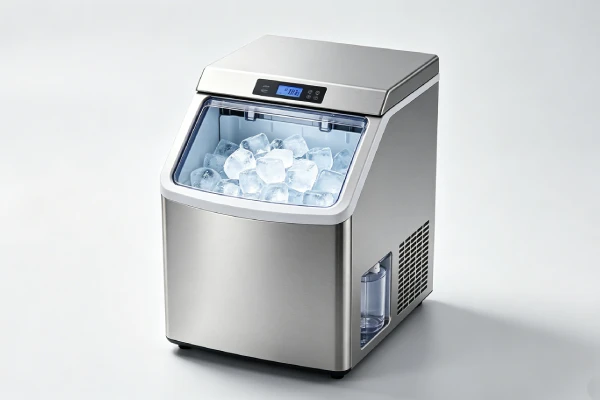
How to Troubleshoot Ice Maker Indicator Lights
- Identify exactly which light is wrong, and whether it is steady or blinking.
- Check that the ice basket and the water reservoir are seated as the manual shows.
- Check the detection area for anything blocking it.
- Check the water level and whether a visible float moves freely.
- Clean only the parts the manual lists as user-accessible, with the materials it allows. This is the cleaning step, not a repair step.
- Perform the reset procedure the manual gives for your model. An ice maker reset is not the same sequence on every unit, so do not borrow a fixed unplug time from another model. If the manual lists no reset, switch off, unplug, wait a short while, plug in and switch on; if the fault remains after that, contact the manufacturer rather than repeating it.
- If the fault remains after those steps, contact the manufacturer or a service technician.
If a reset clears the light and it returns within a short time, that points to an intermittent connection or a sensor that is drifting rather than to a one-off glitch; treat it as a service question.
When Does an Ice Maker Need Professional Repair?
Stop troubleshooting and contact the manufacturer or a qualified technician if:
- The light fault remains after the bin, tank, detection area and reset checks.
- More than one indicator is wrong at the same time. Check the power indicator and the main status light first, since those tell you whether the panel is alive at all.
- The machine will not start, or keeps stopping mid-cycle.
- There is a burning smell, abnormal heat, or an electrical noise.
- You suspect a sensor, wiring or board fault inside the housing.
Indicator faults alone rarely justify replacing a machine. The maintenance decision should follow the actual fault, whether the part is available, and the repair quote against a replacement, not the age of the unit.
Frequently Asked Questions
Why does my ice maker say ice full when it is empty?
Check that the basket is seated, that nothing blocks the detection area, and that the detection surface is clean and dry. If it still reads full, the sensor or its circuit needs checking by service.
Why does my ice maker say add water when it is full?
Check the level against the manual’s mark, reseat the reservoir, and check whether a visible float moves freely. If it still reports empty, contact the manufacturer.
Where is the ice full sensor on a portable ice maker?
It is usually near the ice chute, above the basket, or at the basket’s base, but its position differs by model. The manual identifies the detection area, and that is the only surface you should clean.
How do I reset an ice maker indicator light?
Use the reset procedure in your manual. If it lists none, switch off, unplug, wait briefly, then plug in and switch on. If the light clears and returns quickly, that is a service question.
How do I turn off the child lock?
Use the sequence in your manual, usually a press-and-hold on one or two buttons. If the manual gives none, ask the manufacturer rather than trying combinations.
Why is my ice maker light blinking?
Blink patterns differ by model and can indicate several conditions. Note the colour, the pattern and what the machine was doing, then match them to the manual’s indicator table. A code such as E1 has its own page.
What if several indicator lights are wrong at once?
Check the power indicator and the main status light first, since they tell you whether the panel is working at all. If several are wrong together, stop and contact the manufacturer.
Can an ice maker sensor be replaced?
On some models a sensor is sold as a spare; on others it is part of a sealed assembly. Check the manual and the parts listing for your model rather than assuming either way.