
A portable ice maker that will not fill is usually reporting one of two things: it believes there is no water, or it cannot move the water it has. Those are different faults with different checks, and they are the two halves of this page. The first is the Add Water light that stays on with a full tank; the second is the pump that runs without moving anything.
This page covers a portable ice maker and countertop ice maker that is not filling. A refrigerator ice maker has a water inlet valve and a fill tube rather than a reservoir and a pump, and it is a different fault path.
Note on model differences: water level detection is a metal probe on some models, a float on others, and an optical or capacitive sensor on others again. Where a step involves a part, the manual shows what your model has.
Which Fault Do You Have?
Before the seven causes, place your machine in one of these groups. It saves reading the wrong half of the page.
| What you see | What it points to | Go to |
|---|---|---|
| Add Water light on, reservoir full | The machine is misreading the water it has | The Add Water section |
| Add Water light off, pump running, no water moving | The machine knows there is water and cannot move it | The pump section |
| No warning, but the machine will not start a cycle | A different stop condition, not a filling fault | The “has water but will not start” section |
| Both Add Water and Ice Full lights on | Two conditions at once, usually a full bin plus a low tank | Check the bin first, then the tank |
The seven causes below cover all four rows.
Why Is My Portable Ice Maker Not Filling with Water?
1. Water Reservoir Not Properly Seated
What you see: the machine reports no water, or does not start a cycle, with a full reservoir sitting in place.
Why it happens: the reservoir has to sit on its locating points for the machine to read it. The most common version is a reservoir that is not pushed fully home; a reservoir sitting at an angle, or resting on a spill, is less common but gives the same result. Some models also need the lid closed, and the manual states whether yours does.
What to check: lift the reservoir out, look at the locating points and the seat for debris, and push it fully home. Close the lid if the manual says the machine needs it. Then switch off and on, because some models only re-read the reservoir at startup.
2. Low Water Level or Incorrect Filling
What you see: the machine runs, then stops asking for water, while the reservoir looks partly filled.
Why it happens: the level is below the minimum the machine expects, the reservoir was filled with the machine running and the reading has not updated, or the tank was filled past the maximum and water has spilled into the base rather than into the tank.
What to check: fill to the marked level, not by eye, and fill with the machine off. Then start it and see whether the warning clears. On a brand-new machine, the first fill can take a cycle before the reading settles; if the warning persists past the first cycle, treat it as a fault rather than a settling period.
3. Dirty or Stuck Water Level Sensor
What you see: the Add Water light on with a full reservoir, or the warning coming and going.
Why it happens: the detection component is not reading the water, and the cause depends on which type the model has:
| Detection type | What to look at | What to do |
|---|---|---|
| Metal probes | Scale or film bridging the probes | Clean the probe surface with a soft cloth; descale only if the manual allows |
| Float switch | A float stuck against its guide, or a float that no longer rises | Free it gently and check it moves through its travel; one that stays stuck is a service question |
| Optical or capacitive window | Film or droplets on the window | Wipe with a soft dry cloth; no abrasives |
Telling a dirty sensor from a failed one: cleaning removes the film, and the warning clears on the next start. Cleaning that changes nothing is not proof the sensor has failed; it means the surface was not the cause, and the next step is the manufacturer.
4. Clogged Water Filter or Inlet Screen
What you see: the pump runs, water moves slowly or not at all, and the machine may eventually warn.
Why it happens: an inlet screen or an inline cartridge is loaded with scale or debris. Where the model has an ice maker water filter, a cartridge past its interval restricts flow the same way.
What to check: find the inlet screen the manual identifies and look at it. If the model has a filter, check its interval against the manual and the ice maker filter replacement schedule. A machine with no filter has nothing to check at this step; skip to the pump.
What to do: clean the screen as the manual permits; replace a cartridge on its stated interval. A portable ice maker water filter, where fitted, follows the same rule.
5. Water Pump Not Working Properly
What you see: the pump runs and no water arrives at the freezing area. The sound matters: a pump with a steady hum is trying to move water, while a pump that is silent has either not been told to run or has stopped.
Why it happens: an air lock after the tank was emptied or the machine was cleaned, a blockage in the internal line, or a pump that has failed.
What to check: confirm the reservoir is full and seated, check the visible inlet screen, and check that no visible hose is kinked. If the machine was just cleaned, run it through a cycle or two and see whether the pump picks up water on its own.
What to do: if water still does not move with a full, seated reservoir, clear inlet, and no kink, the fault is inside. An ice maker water pump not working fault is a service question rather than an owner repair. Do not pressurise the line with a syringe or a baster: the water path differs between models, and forcing water into it can cause a leak in a place you cannot see.
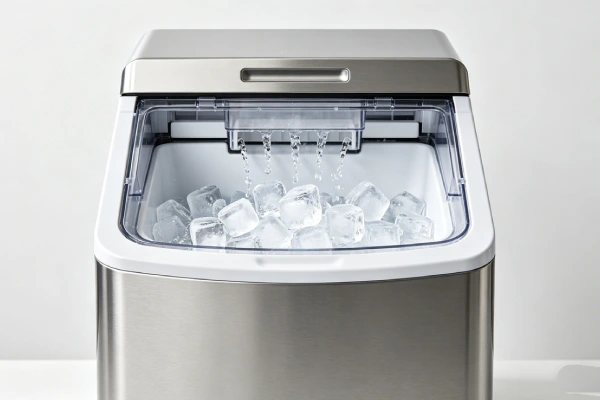
6. Blocked or Kinked Water Line
What you see: flow that was fine has dropped off, or the machine fills slowly and noisily.
Why it happens: an internal hose folded against the housing, a line pinched during reassembly after cleaning, or scale narrowing a narrow passage.
What to check: the visible hose runs, and whether anything has been pushed against the machine since it last worked. A hose that kinks when the reservoir is pushed home is a routing problem.
What to do: restore the routing, and follow the manual’s descaling routine where scale is the cause. The ice maker descale interval exists for this, and an ice maker descale solution or cleaning tablets should be the ones the manual names.
7. Faulty Water Level Switch or Control Board
What you see: the warning persists after seating, filling and cleaning, or the machine behaves inconsistently — starting a cycle and then stopping for no visible reason.
Why it happens: the detection component or the board that reads it has failed.
What to do: contact the manufacturer. This is the point where owner checks end.
The Add Water Light Is On but the Tank Is Full
This is the most common form of the problem, and the order matters.
- Check the level against the marked line, not by eye.
- Reseat the reservoir fully, and close the lid if the model has a lid switch.
- Switch off and on, because some models only re-read the tank at startup.
- Identify the detection type from the table in cause 3, and inspect the part your model has.
- Clean only what the manual lists as user-accessible, with the cloth and any agent it permits.
- If the light stays on, contact the manufacturer. A warning that survives cleaning points at the detection component or the board, and neither is a part to order on a guess.
The Pump Runs but No Water Comes Out
- Confirm the reservoir is full and seated.
- Check the inlet screen for scale or debris.
- Check the visible hose runs for a kink or a pinch.
- If the machine was just cleaned, run a cycle or two and see whether it picks up on its own.
- If nothing moves, stop using it. A pump that runs dry is a pump under strain, and the machine’s own water-level protection is meant to prevent that — if it is running dry, something in the detection path is also suspect.
The Machine Has Water but Will Not Start
Two other warnings can stop a cycle before filling begins, and they are worth separating from the Add Water light:
- The ice bin full condition. If the basket is full, or ice has piled against the sensor, the machine stops. Sweep the ice across and reseat the basket; an ice maker ice full sensor stuck fault is the version where the light stays on with a clean, empty basket.
- A control or power fault. If no light behaves as the manual describes, check the outlet and the cord before assuming the board.
How to Fix a Portable Ice Maker That Is Not Filling
Reinstall the water reservoir fully, clear the seat, and close the lid if there is one.
Clean the water level detection area with the cloth the manual permits, on the detection type your model has.
Clean the water filter or inlet screen where the manual lists it as user-accessible.
Follow the manufacturer’s descaling procedure, at the dilution and interval it states, rather than a general vinegar routine. Models differ in what their water path tolerates, and an ice maker hard to clean area is usually one the manual tells you to leave alone.
Contact customer support if the warning survives all of the above.
Should You Repair or Replace?
Three questions, in this order:
- Is it in warranty? The ice maker warranty decides whether the repair is the manufacturer’s cost. Do not open the housing before checking, because opening can affect the claim.
- Is the part sold separately? A pump, a sensor or a reservoir that is not sold as a spare turns a repair into a replacement. Ask the manufacturer or check the parts listing by model number.
- What is the quote against a comparable machine? The ice maker repair cost comparison sets out how to weigh it. The ice maker return policy matters if the machine is new enough to return rather than repair.
A reservoir that is not seated, a dirty detection area or a blocked screen does not belong in this calculation at all — those are the first three causes, and they cost nothing to fix.
How to Prevent Water Supply Problems
- Fill to the mark, with the machine off, and reseat the reservoir every time.
- Use the water type the manual specifies. If mineral buildup keeps returning, check whether the manual recommends filtered or purified water for your model rather than assuming distilled.
- Follow the descaling interval the manual states, with the agent it names. The ice maker maintenance schedule for your model is the reference, not a general routine, and portable ice maker maintenance intervals differ between models.
- Clean the reservoir and the visible inlet screen at each descale, which is also when an ice maker cleaning pass is easiest.
- Keep the machine level and its vents clear, since a machine running hot works harder and its cleaning routine gets skipped when the machine is hard to reach.
Frequently Asked Questions
Why does my ice maker say Add Water when it is full?
The reservoir is not fully seated, the level is below the mark, the detection area is dirty, or the machine has not re-read the tank since it was filled. Work through those in that order before assuming a failed sensor.
Why is my ice maker pump running but not pumping water?
A full but unseated reservoir, a blocked inlet screen, a kinked hose, an air lock after cleaning, or a failed pump. If the first four are clear, it is a service question.
Can a dirty water sensor stop an ice maker from working?
Yes, on models where the level sensor gates the cycle. Cleaning the detection area is the first step, but a warning that survives cleaning is not proof the sensor has failed.
How do I reset a portable ice maker?
Use the sequence in the manual; if it lists none, switch off, unplug, wait briefly, plug in and switch on. Some models only re-read the reservoir at startup, which is why a reset is step three above.
Can hard water block an ice maker water line?
It can narrow the line and load the inlet screen. Descaling on the manual’s interval, with the agent it names, is the prevention.
Should I keep running an ice maker that is not filling?
No. If the pump runs without moving water, or the machine keeps calling for water it has, stop and work through the checks. Running a pump dry is the expensive outcome.
My float looks stuck. Can I free it?
Free it gently and check that it moves through its full travel. A float that stays stuck, or that no longer rises with the water, is a service question rather than something to force.
Both the Add Water and Ice Full lights are on. Which first?
The bin. Clear and reseat the basket, then recheck the tank. A full bin can stop the cycle before the water question is even asked.